
# HTF Structure

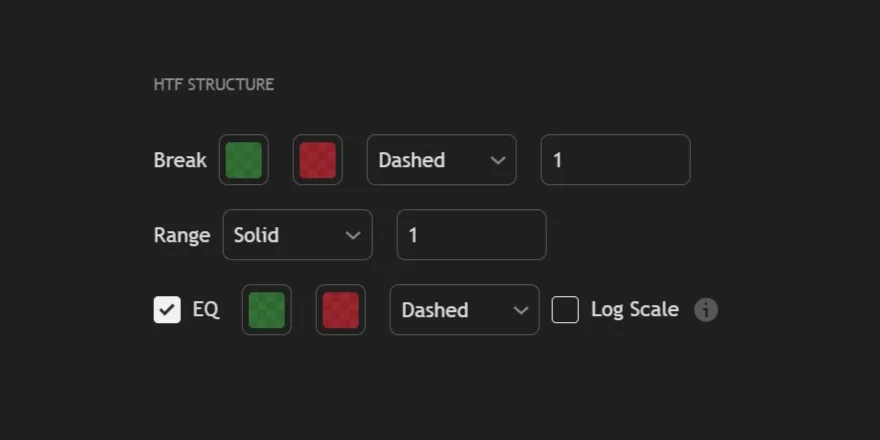
Structure Style controls how REx draws break lines, range boundaries, and the equilibrium midpoint. Purely visual — none of these settings affect detection logic.
***

<figure><img src="https://2404540482-files.gitbook.io/~/files/v0/b/gitbook-x-prod.appspot.com/o/spaces%2FuK39Nj2efLknCBW9clay%2Fuploads%2Fgit-blob-4f48a5b6b6d76fd06c7082928c502fa1fba4c854%2FHTF.png?alt=media" alt=""><figcaption></figcaption></figure>

***

<table data-header-hidden><thead><tr><th width="40"></th><th></th></tr></thead><tbody><tr><td><mark style="color:green;"><strong>1.</strong></mark></td><td><kbd><mark style="color:purple;"><strong>Break</strong></mark></kbd> controls how break points are displayed on the chart, including their color, line style, and thickness.</td></tr></tbody></table>

<table data-header-hidden><thead><tr><th width="40"></th><th></th></tr></thead><tbody><tr><td><mark style="color:green;"><strong>2.</strong></mark></td><td><kbd><mark style="color:purple;"><strong>Range</strong></mark></kbd> defines the visual style of the active range, allowing you to adjust the color, line style, and thickness</td></tr></tbody></table>

<table data-header-hidden><thead><tr><th width="40"></th><th></th></tr></thead><tbody><tr><td><mark style="color:green;"><strong>3.</strong></mark></td><td><kbd><mark style="color:purple;"><strong>EQ</strong></mark></kbd> (Equilibrium) displays the midpoint of the range. When enabled, you can customize its color and line style. The Log Scale option adjusts the equilibrium calculation to match logarithmic charts.</td></tr></tbody></table>

<div data-with-frame="true"><figure><img src="https://2404540482-files.gitbook.io/~/files/v0/b/gitbook-x-prod.appspot.com/o/spaces%2FuK39Nj2efLknCBW9clay%2Fuploads%2Fgit-blob-2970a282c7349c27f03f287420ba77f579c6c52d%2Fstructurestyle1.png?alt=media" alt=""><figcaption></figcaption></figure></div>

***
